

Help

欢迎!

该社区面向专业人士和我们产品和服务的爱好者。
分享和讨论最好的内容和新的营销理念,建立您的专业形象,一起成为更好的营销人员。


0

Customer Statements

Avatar
odoo
1 Comment
Avatar
Discard
Avatar
odoo
-

Thank you all for the feedback.

5 Answers
0
Avatar
odoo
Best Answer

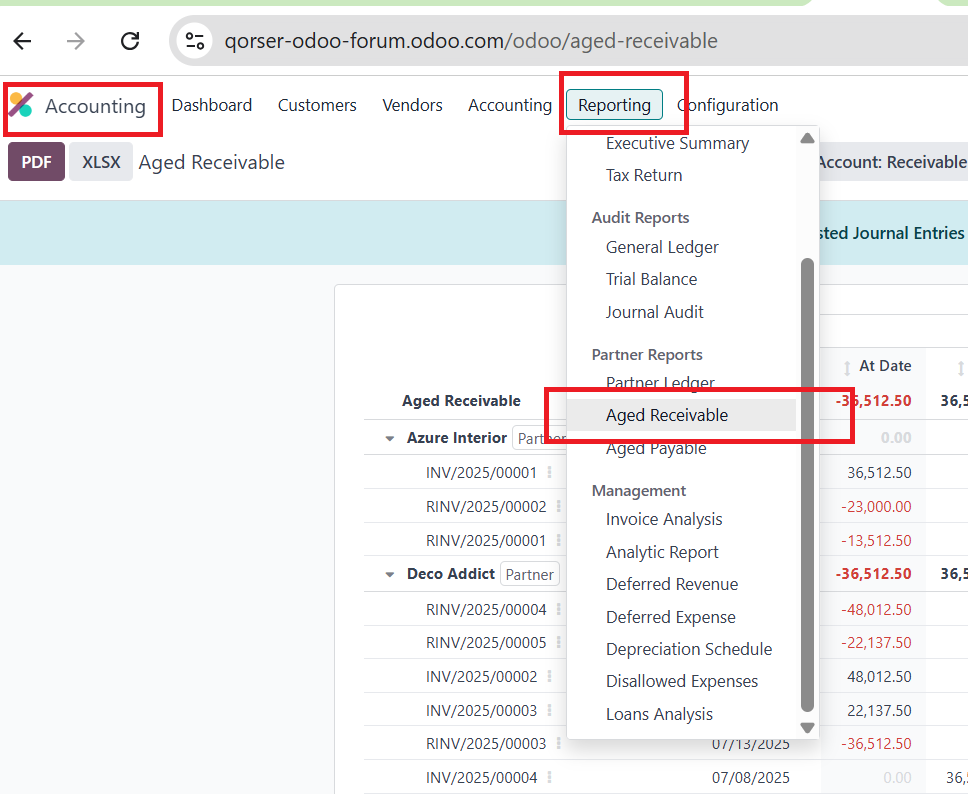
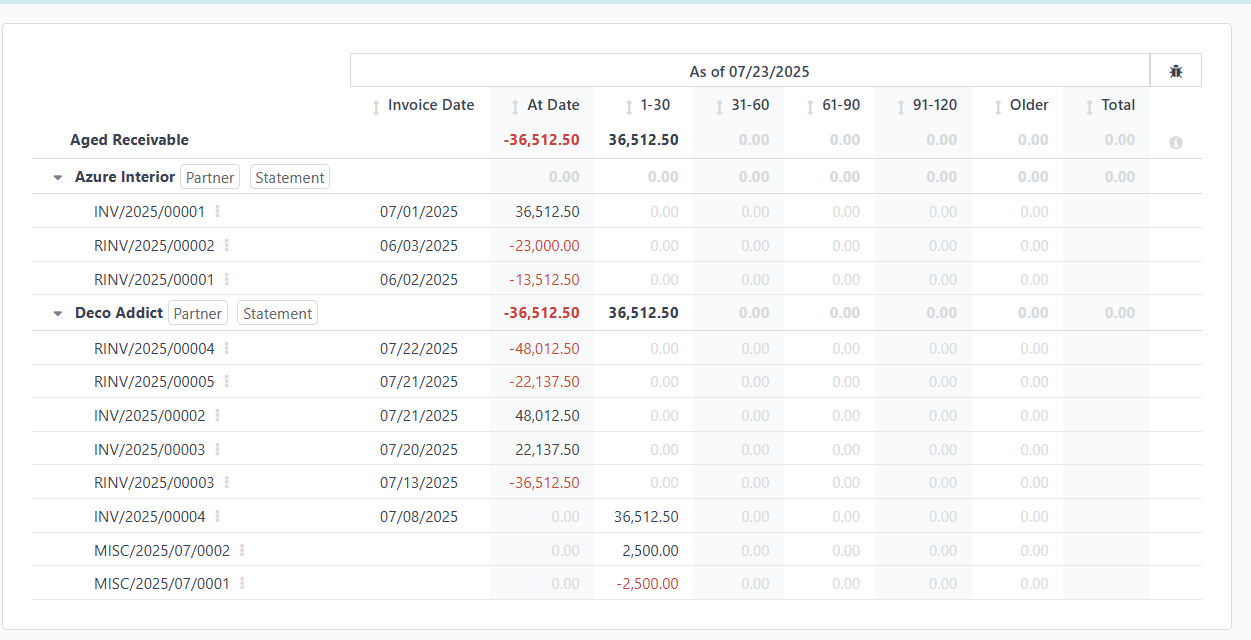
The report you are likely referring to is the Aged Receivable Report. This report provides a clear view of outstanding customer invoices grouped by aging periods (e.g., 0–30 days, 31–60 days, etc.).

You can access it through:

Accounting > Reporting > Partner Reports > Aged Receivable

This report follows a standard layout widely used in accounting to track overdue receivables and helps identify which customers owe money and how long those amounts have been outstanding.
Avatar
Discard
0
Avatar
odoo
Best Answer

Hello,

There is a free module available in Odoo called Accounting Customer Statements. Install that and you will be abale to generate the statements from the partner.

https://www.youtube.com/watch?v=XC8DLpfZfjw

Avatar
Discard
0
Avatar
odoo
Best Answer

Odoo (especially in Enterprise) does not include customer statements by default in Accounting. This feature — showing a customer's outstanding invoices, due amounts, and payment history — is not available out-of-the-box.

 Solution: Use Free or Paid Customer Statement Modules

You can enable customer statements in two ways:

  1. Install Community Modules
    • Modules like account_financial_report, customer_statement, or partner_statement (available on the Odoo App Store).
    • These allow you to generate:
      • Open Invoices
      • Overdue Balances
      • Full ledger activity
  2. Odoo Enterprise: Email Statements via Follow-Up
    • Navigate to Accounting > Customers > Follow-Up Reports
    • You can send payment reminders, but they are not full customer statements.
    • Limited layout/customization.

 How to Add Customer Statement Option (If Missing)

If you're on Odoo 18 and need more customization:

  • Create a custom report using QWeb or Excel templates.
  • Include:
    • Customer info
    • Invoice dates
    • Due amounts
    • Payments received
  • Add a menu under Accounting > Reporting > Customer Statement

Avatar
Discard
0
Avatar
odoo
Best Answer

Hello, the report you might be referring to is the Aged Receivable Report. You can access it from the Accounting > Reporting > Partner Reports > Aged Receivable module, and I believe the template is already in a standard format commonly used to show customer invoice aging. Below is the view of the Aged Receivable Report.  


If you're not satisfied with the default layout, would you be able to provide the desired template? Thank you.

Regards,

Appschef ​

Avatar
Discard
0
Avatar
odoo
Best Answer
1 Comment
Avatar
Discard
Avatar
odoo
-

Hi Cybrosys,

We used the Accounting Customer Statements module in V17 SaaS Australia (Your "How To Generate..." slide deck, slide 3), however since the move to V18, it's no longer available to install, and all we can now produce is the out of the box Partner Statement, which may be acceptable for internal reporting, isn't acceptable to send to a customer as the Accounting Customer Statements module was. Any idea if this is going to be re-introduced?