

Activate Developer Mode, and navigate to the Sales --> Orders --> Quotations Menu.
From the Debug Menu, navigate to User Interface --> Action.
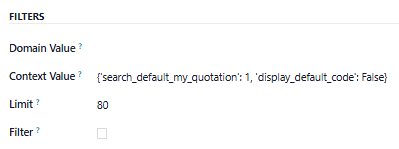
In the Context Value field, add the following:
'display_default_code': False
The Quotation / Sales Order PDF and the Customer Portal View will now show just the Product Name without the Internal Reference.
Note that once you access the Quotation from the Sales Orders Menu, your internal Users will see the Internal Reference but your Customers will not. You can make the same change to the Sales Orders Menu Action if you also want to hide it for records opened from there. Also, this change will affect Quotations created AFTER you make this change, not those made before you make this change.